Welcome to Tricks4indya.

Tricks4indya is a blog/website where you get latest computer tips and tricks, hacking tricks, Windows tips and tricks and most important learn about Ethical Hacking.

Why you visit Tricks4indya daily?

Because Tricks4indya is not one taste blog and daily update(daily share two or three article sure). If you visit daily then you get different taste of article to read means those friends who don’t like to read HACKING article but like windows tips, awareness(to protect from hackers) article, information about newly technology…ect.
Showing posts with label Windows7. Show all posts

Wednesday, 18 May 2011

Easily Change the Windows Administrator password while logged to the computer


Today I am going to share a post on “how to reset/change the Windows administrator account” & this tutorial is going to be the easiest and the smallest tutorial ever. 


For this you need to be logged in to computer from any user account (means you are either member of Administrators or Users Group).

Now, follow the step by step instruction: -

·         Go to RUN(Press window key + R) and type control userpasswords2


·         Select the user you want to change the password.


·         Click on Reset Password Tab
·         And Reset the Password.


·         DONE.

NOTE: - Above tricks is not work if you are a user of Guests Group.

I think you must like “
Easily Change the Windows Administrator password while logged to the computer” & i will post another good tutorial on password cracking SOON. So, Keep visiting Tricks4indya.

Note: This is illegal and is for educational purpose only. Any loss/damage happening will not be in any way our responsibility.

If you want to keep up-to-date on the Ethical Hacking Tutorials news, latest Tips & Tricks, latest scams & most important awareness and are a member of Facebook, don't forget to Join the Tricks4indya Facebook page to keep informed about the latest security.

By: TwitterButtons.com

Monday, 16 May 2011

Setting Backdoor in Windows | Command Prompt On Logon Screen

Let’s assume that you have just cracked victim's windows password or simply got access to his windows for some time. Can you make some changes in windows so that you could access the windows again even if victim changes the password??  Or can you make any changes in your own windows so that you could access it anytime even if anybody sets/changes password?

Simply can we set a backdoor in windows?

Yes we can :).


Backdoor actually means maintaining access.
okay lets do one thing first. Open your command prompt (run as administrator in windows 7/vista).

Type the following command: -

Syntax : net user account.name *
Example: net user administrator *
and hit enter. Set any password for that account.


Hopefully your new password must have been set. Did you notice one thing? It didn't ask you to confirm old password. Now suppose if anyhow we manage to access command prompt at logon screen (without logging in), we can easily change/clear password.  


Okay let’s move on.
Now press shift key five times and you must have got a dialog box "sticky keys" on screen.


Sticky keys is a feature that makes it easy for users who have physical disabilities to press multiple keys at time. This is the only feature which can be used before logging in at logon screen (as per my knowledge). I repeat this feature can be used at logon screen by pressing shift key five times.


Whenever we start an application like paint, we are actually running mspaint.exe placed in C:\windows\system32 or command prompt, we are running cmd.exe placed in system32 directory, similarly
when we press shift key 5 times or use sticky keys feature, system actually starts the executable file sethc.exe placed in system32 directory. This means if we rename cmd.exe to sethc.exe and press shift 5 times, system would again start sethc.exe but instead of sticky keys the command prompt will be opened.


But you just can’t simply rename it or change system32 files. Follow the tutorial for that.

 Tutorial: -

·        Go to C:\windows\system32
·        Copy cmd.exe on your desktop and rename it to sethc.exe .
·        Now copy that file and paste again in system32 directory.


@ Windows XP Users

Hopefully existing original sethc.exe must have been replaced and your job is done. Now press shift five times and you would see command prompt on screen. You can access command prompt at windows logon screen and change/clear the password easily using "net user" command.

Note: You can also do these changes while using windows Guest Account. But when you would access command prompt at logon screen, you can change/clear password even of administrator's account. This is exactly how, we can hack into administrator's account through guest account.

@ Windows vista/7 Users

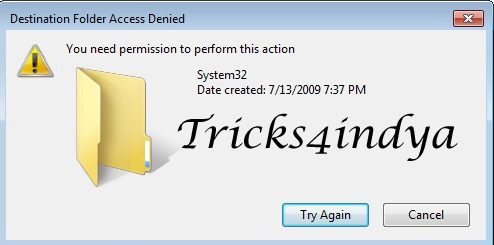
you must have got a pop up box saying "Access Denied".


Actually you cannot change system32 directory files until you do not have the permissions. You cannot have the permissions until you do not have the ownership. So let’s take ownership, change permissions, and just follow the steps: -

1.   Right click on sethc.exe and run as administrator.  Again right click on sethc.exe, open properties. Now, Click on Advanced tab, then on owner and click edit, change the owner from "trusted installer" to "administrator" and click apply.


2.   Then click on 'Edit' in security tab to edit permissions. Click on ‘Administrators’, give it full control and apply changes.


Okay it’s done now.

Now try replacing the original sethc.exe with our sethc.exe (got by renaming cmd.exe). Press shift key five times and hopefully you would get command prompt on the screen instead of sticky keys.

Enjoy Command prompt at logon screen...

So do not forget to set this backdoor whenever you would get friend’s laptop for a few minutes... :)


Note: This is illegal and is for educational purpose only. Any loss/damage happening will not be in any way our responsibility.

If you want to keep up-to-date on the Ethical Hacking Tutorials news, latest Tips & Tricks, latest scams & most important awareness and are a member of Facebook, don't forget to Join the Tricks4indya Facebook pageto keep informed about the latest security.

Incoming Search:-

Hack Windows 7 login password
Hack Windows Vista login password
Hack Windows XP login password
Reset Your Windows login password

By: TwitterButtons.com

Sunday, 15 May 2011

Windows Logon Password – How Crackers work?

Cracking windows logon password is not so difficult. You can get many offline password crackers which could change/clear the existing password (like offline nt password and registry editor) or cracks the existing password (like oph crack). Just download their ISO images, burn them, insert to CD ROM and then things are simply self explanatory. I am writing this post to make you clear that how actually these password crackers work. 


Okay when you set windows logon password, it is obviously stored in a file somewhere in windows. The password is stored in SAM file placed in %systemroot%\system32\config (like C:\windows\system32\config).

Now why we just don’t try to open SAM and see all stored passwords. Okay let’s do it, go to C:\windows\system32\config and open SAM. You must get an error that " it is in use by some another application". Actually we can’t open SAM file when windows is running. Even if anyhow we manage to access the content of SAM file, we won't get the passwords in clear text but they are encrypted.


So, what is SAM file?

SAM stands for Security Accounts Manager. SAM is database stored as registry in windows that stores windows users passwords in hashed formats (LM and NTLM). These are usually called as hashes.


What are hashes?

Hashes are kind of encryption.  A hash function is a one way function. One way means, if plain text is converted into hash, it cannot be converted back to plain text. Remember this is the most important Point that they are one way functions.


What is windows authentication procedure?


Whenever a user creates new account in windows, its password is converted to hash and stored in SAM database. When user logins, the password is converted to hash and is compared with the stored hash in SAM database, if both the hashes match, the user is authenticated.


How to access SAM file?

SAM file cannot be moved/copied or opened when windows is running. It can be accessed only when windows is offline/not running. Got confused that how can we use the windows files when it is not running?

Here comes the concept of Live Operating systems. A live CD is containing a bootable OS. Just insert it in CD ROM and you can use it without any installation.


How to crack Windows password?

Okay suppose we have got access to SAM file and have password hashes. Don’t you think it’s useless because hashes can’t be converted to plain text? Let’s see, what we can do.


We (I mean automated tools) can actually do two things.


1.   Clear/Change password: - Clear the existing hash and put new hash (we know algorithm to convert plain text to hash) in order to change/clear the password. This is how offline nt password and registry editor work. It doesn't give you the original password but helps you to change/clear it.


2.   Crack password: - Make a long list of all possible combinations of alphabets, numbers and convert them to hashes. Compare every hash with hash we obtained from SAM file and hashes could be cracked. This is exactly how OPH crack works. It has already saved hashes of many possible combinations of letters/numbers stored in tables called as rainbow tables.


I hope things are clear to you :).


Note: This is illegal and is for educational purpose only. Any loss/damage happening will not be in any way our responsibility.

If you want to keep up-to-date on the Ethical Hacking Tutorials news, latest Tips & Tricks, latest scams & most important awareness and are a member of Facebook, don't forget to Join the Tricks4indya Facebook pageto keep informed about the latest security.

Incoming Search:-

Hack Windows 7 login password

Hack Windows Vista login password

Hack Windows XP login password

Reset Your Windows login password

By: TwitterButtons.com

Wednesday, 11 May 2011

Download Windows 8 Transformation Pack For Windows 7

Hi friends, as we all know that Microsoft is busy with their new Windows 8 OS, and I think it will take another 6 months to get it released. But we can't wait more to know Windows 8 features and its latest design interface. So now you can check is latest look with the help of Windows 8 Transformation Pack. It will load your current Windows with new stunning Windows 8.

Windows 8 Transformation Pack : -

·        New And Updated Boot Screen
·        New GUI Windows Explorer
·        Latest windows Login Screen
·        With Genuine Windows 8 Aero Theme
·        And many other new and updated features

Windows 8 Transformation Kit Will Convert Windows 7 Like Below:


Download Windows 8 Transformation Pack For Free: -

Now you can download This Transformation Pack For Free From Here
Download Windows 8 Os (Transformation pack)

So friends, I hope you enjoyed this article and will check out this pack soon, if you have any problem regarding, Download Windows 8 Transformation Pack. Then please feel free to share your problem via comment and also to share your feedback. Thank you and please do comments.


Note: This is illegal and is for educational purpose only. Any loss/damage happening will not be in any way our responsibility.

If you want to keep up-to-date on the Ethical Hacking Tutorials news, latest Tips & Tricks, latest scams & most important awareness and are a member of Facebook, don't forget to Join the Tricks4indya Facebook page to keep informed about the latest security.

By: TwitterButtons.com

Related Posts Plugin for WordPress, Blogger...
Twitter Delicious Facebook Digg Stumbleupon Favorites More